Blog
O*NET names the software each occupation uses, which is the software an RL environment has to run
O*NET's Software Skills listing names the applications each occupation works in, down to the product: 45 categories for Customer Service Representatives. Why that list is the first question for anyone building an RL environment on real work.
Published September 26, 2026
O*NET (the US Department of Labor’s Occupational Information Network) lists the software each occupation works in, down to the product, and that list is the first thing a reinforcement learning (RL) environment for the occupation has to reproduce. As of release 31.0 (August 2026), O*NET OnLine lists 45 software categories and about 112 entries for Customer Service Representatives, including Salesforce, Oracle PeopleSoft, and Kronos Workforce Timekeeper. Payroll and Timekeeping Clerks have 25 entries in time accounting software alone. Before anyone can grade an agent on an occupational task, somebody has to decide which software the task runs in, license it, pin its version, and make it resettable. An RL environment is a resettable copy of real software plus a grader. This listing names the software half of that definition. Of the four public benchmarks compared below, one runs on the real application an occupation names; the other three run on stand-ins.
Which software does O*NET list for an occupation?
ONET’s Software Skills listing is the set of named products, grouped by category, that each occupation’s page on ONET OnLine carries, drawn from occupational surveys and employer job postings. Categories include customer relationship management (CRM) software, enterprise resource planning (ERP) software, and time accounting software. Two flags come from job postings. O*NET OnLine’s definitions of Hot Technology and In Demand are: a requirement frequently included across all employer job postings, and one frequently included in postings for that particular occupation.
For Customer Service Representatives, three categories carry a product with both flags: electronic mail, office suite, and spreadsheet software. For Payroll and Timekeeping Clerks, five do, and time accounting software is one of them.
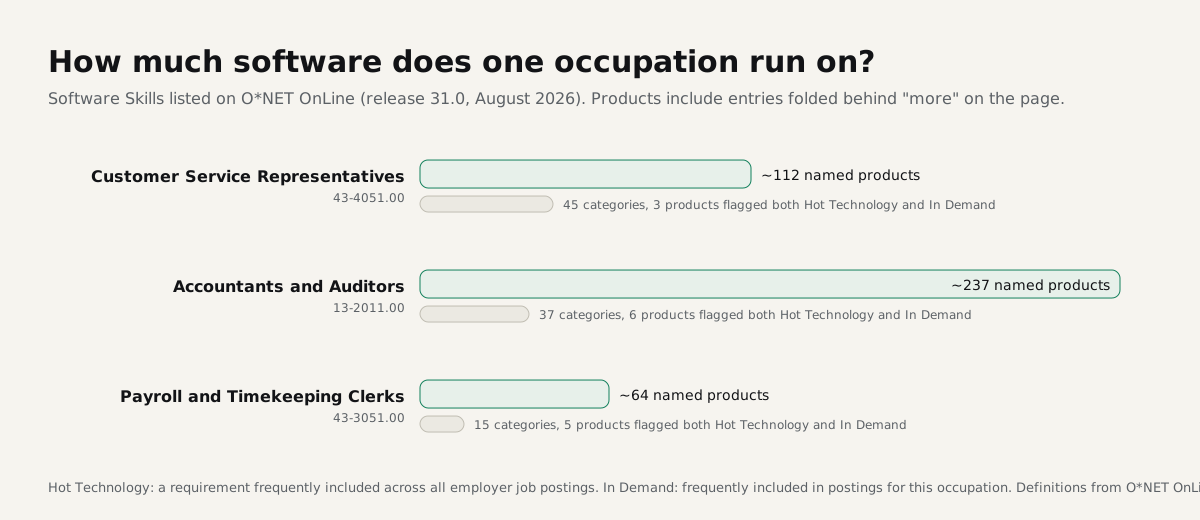
The listing works at the level of the occupation. It tells you that O*NET lists Kronos, ADP Workforce Now, Workday, Oracle PeopleSoft, and Microsoft Excel for payroll clerks. It does not tell you which of those a specific task touches. That mapping, from a task statement to the applications it crosses, is one of the limits we listed in how to read O*NET’s task tables, and it still needs a practitioner.
What do agent benchmarks run on instead?
Of the four benchmarks below, only WorkArena runs on the real application an occupation names; the others run on stand-ins.
- tau-bench uses a purpose-built retail order database and an airline reservation database, with 7 write and 8 read tools in retail and 6 and 7 in airline, in place of any real order or reservation system.
- TheAgentCompany runs on open-source alternatives: GitLab for source hosting, OwnCloud for file storage, Plane for task management, RocketChat for messaging.
- WorkArena runs its 33 tasks on the real ServiceNow platform.
- Zapier’s AutomationBench builds simulated business applications that agents call through web APIs (application programming interfaces); its paper counts 47 applications across six domains, and the independent leaderboard run by Artificial Analysis describes 40 simulated software-as-a-service applications in its private subset.
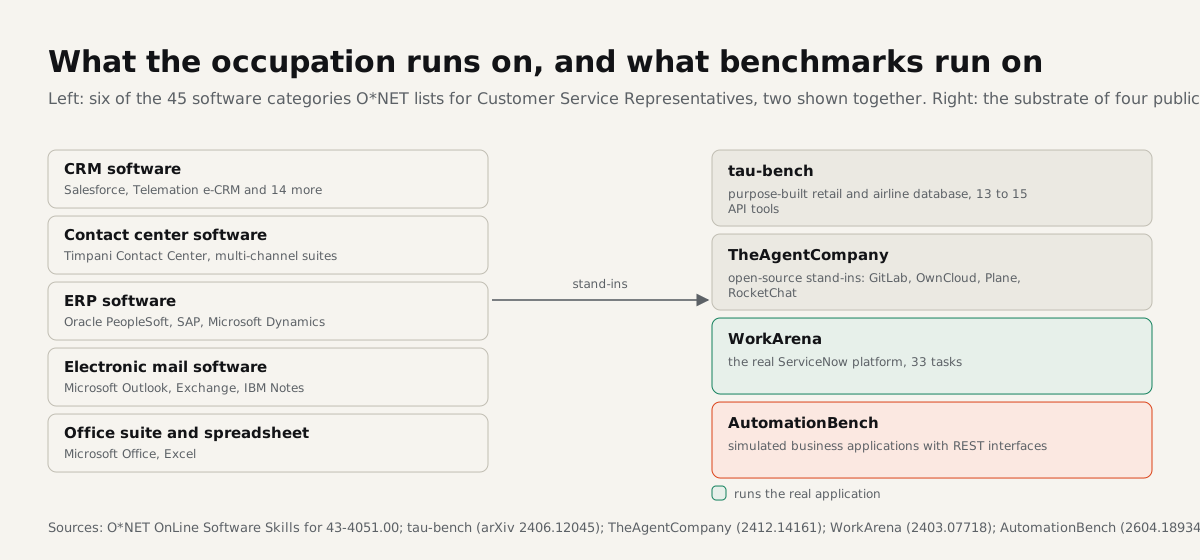
A stand-in makes a benchmark easy for anyone to rerun, because the real systems are licensed, versioned, and full of customer data. It also changes what a score means. An agent that handles tau-bench’s retail order database through its seven write tools has not been tested on the record structure, permissions, or failure modes of Salesforce or PeopleSoft. Our audit of four benchmarks against the Core tasks of Customer Service Representatives checks what those stand-ins leave untested.
Why does the software matter for the cost of an environment?
The software sets the floor on an environment’s cost. Licensing the application, pinning its version, hosting it in an isolated sandbox, and building a reset that restores the same saved starting data before every run is work every environment needs. In our post on how long custom RL environment builds take we called this the substrate stage. As that post notes, a vendor who already operates the application skips the stage on a new build, and a buyer who does not ask about it tends to underestimate it.
The O*NET listing turns the stage into a checklist. For a payroll environment, the listing says the work runs through time accounting software, ERP, human resources software, and a spreadsheet, and it names the products employers ask for. Each one is a licensing conversation, a version pin, and a reset design. A benchmark that substitutes a generic database for all four has skipped this stage, so its score does not measure work in those four applications.
What to ask a vendor about the software underneath
Ask which of the occupation’s named software categories the environment runs on, which are real applications at a pinned version, and which are stand-ins. Ask how reset works for each. Our environment catalog centers on HR, payroll, and applicant tracking software because those are the categories we can license, pin, and reset.
RL Supply Atlas is a map of AI and human work: explore the workflows behind a profession and the AI research connected to them, so you can decide what to investigate next. If you know which occupation you need, request a sample packet and we will go through its Software Skills list with you.
Request supply